• Home
  • Blog
    • Travel Tips & Guides
    • Working Abroad
    • Photography
    • Books
  • Travel
    • Europe
    • South Korea
    • Japan
    • Australia
      • Western Australia
  • Free Resources
  • Shop
  • Portfolio
  • About
    • About Me
    • Frequently Asked Questions
  • Work with Me

Explore

  • Work With Me
  • About Me
  • Shop
  • Blog

Connect

Kelly Today

Blog, Photography · October 4, 2025

How to Edit Like a Pro Using Fujifilm Lightroom Presets

share tweet share pin post share

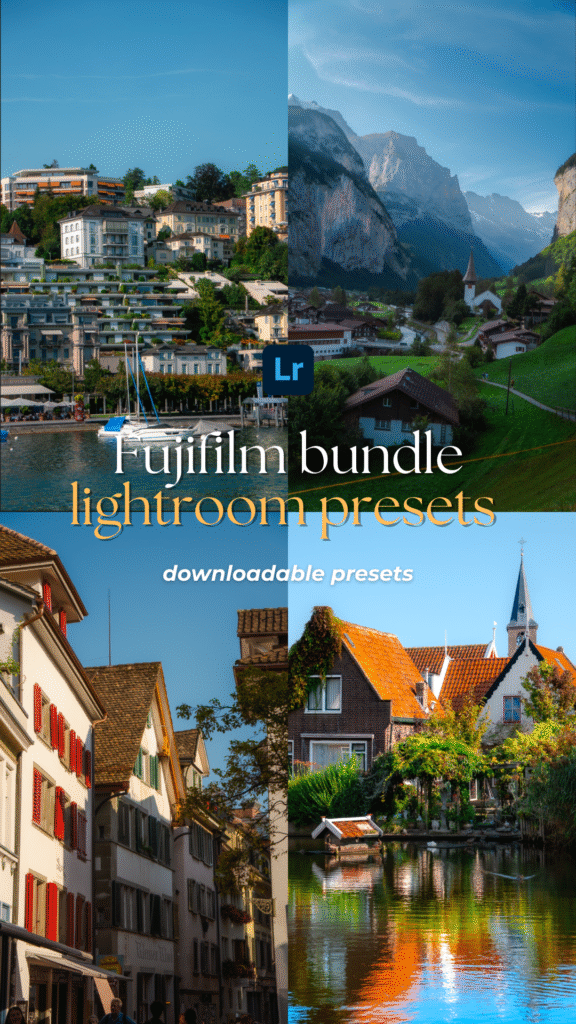
Editing is one of the most rewarding parts of photography, but it can also feel overwhelming when you’re just starting out. With endless sliders, tones, and adjustments in Lightroom, knowing where to begin isn’t always easy. That’s where Fujifilm Lightroom Presets come in.

Inspired by Fujifilm’s iconic film simulations, these presets give your photos a timeless, film-like aesthetic in just one click—whether you’re shooting travel, portraits, or everyday moments. The best part? They save you time while still leaving room for your own creative touch.

In this guide, I’ll walk you through how to install and use Fujifilm Lightroom Presets, along with practical editing tips to help you get the most out of them. Whether you’re new to photography or looking to refine your editing workflow, these steps will help you edit with confidence and achieve professional results.

Disclaimer: This post may contain affiliate links, which means I get a small commission if you make a purchase (at no extra cost to you). It’s one of the ways I can keep producing free resources and guides for my readers. Thank you for your support! Refer to the Disclosure Policy for more details.

Contents hide
1 How to Start Editing with Lightroom Presets
1.1 Download and Install Your Lightroom Presets
1.2 Create and Save Your Lightroom Presets
1.3 Import Your Photos in Lightroom
1.4 Choose the Photo You Want to Edit
1.5 Apply the Fujifilm Lightroom Presets
2 Top Tips for Editing with Lightroom Presets
2.1 Shooting in RAW
2.2 Adjust Exposure First
2.3 Adjust the Temperature
2.4 Batch Edit for Consistency
2.5 Add Your Personal Touch
3 Sample Photos Using Fujifilm Lightroom Presets
4 Download Fujifilm Lightroom Presets

Short on time?

Here are my top recommendations for photography:

✨ Edit smarter, not harder — speed up your workflow with my best-selling Fujifilm Lightroom Presets and give your photos a professional finish in just one click.

📸 Take your photography further — download my free 30+ page Photography Guide packed with exclusive tips, editing tricks, and practical advice to help you grow.

💡 Invest wisely in your gear — discover my go-to camera equipment that’s worth the money and has made the biggest difference in my photography.

💵 Earn cashback shopping online with your favourite brands through Shopback ($20 bonus when you sign up) or TopCashback ($50 bonus when you sign up)

How to Start Editing with Lightroom Presets

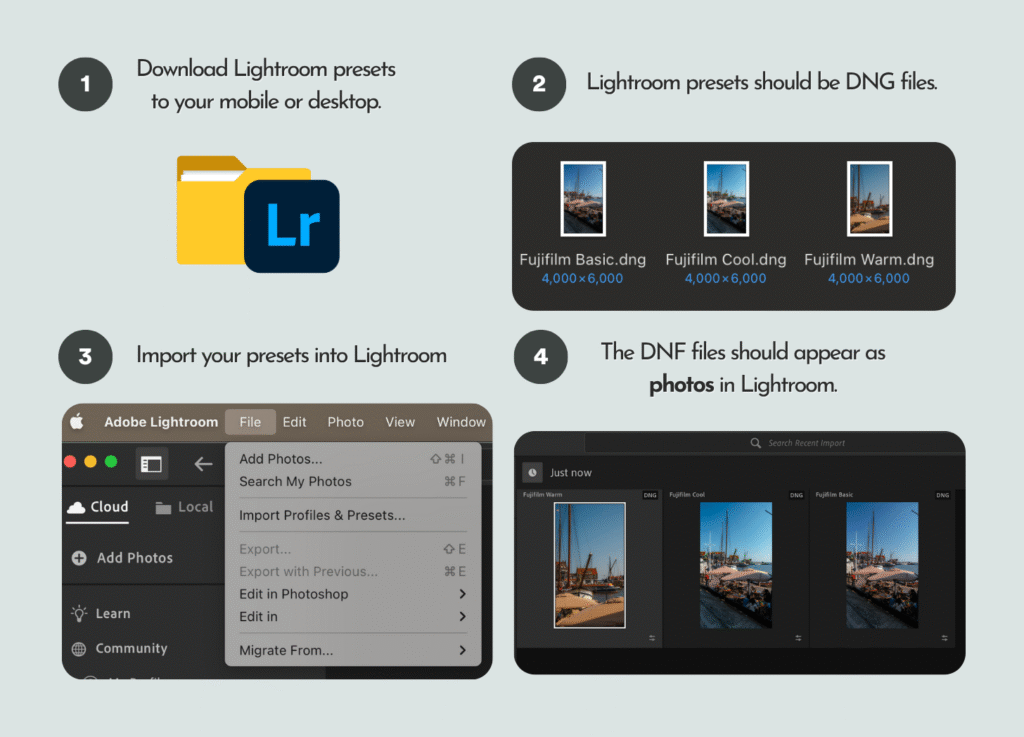
If you’re new to presets, here’s a simple step-by-step guide to installing and using them in Lightroom. These steps can be followed after you’ve downloaded your Lightroom presets.

Download and Install Your Lightroom Presets

First, import your downloaded presets into Lightroom (desktop or mobile). The exact file format will depend on where you got them from. For example, the Fujifilm Lightroom Presets I’ve created come as DNG files, which can be imported directly into Lightroom as photos.

Tip: Adobe Lightroom is free on mobile, but a subscription is required for desktop use.
How to Edit Like a Pro Using Fujifilm Lightroom Presets
How to install Fujifilm Lightroom Presets in Adobe Lightroom

Create and Save Your Lightroom Presets

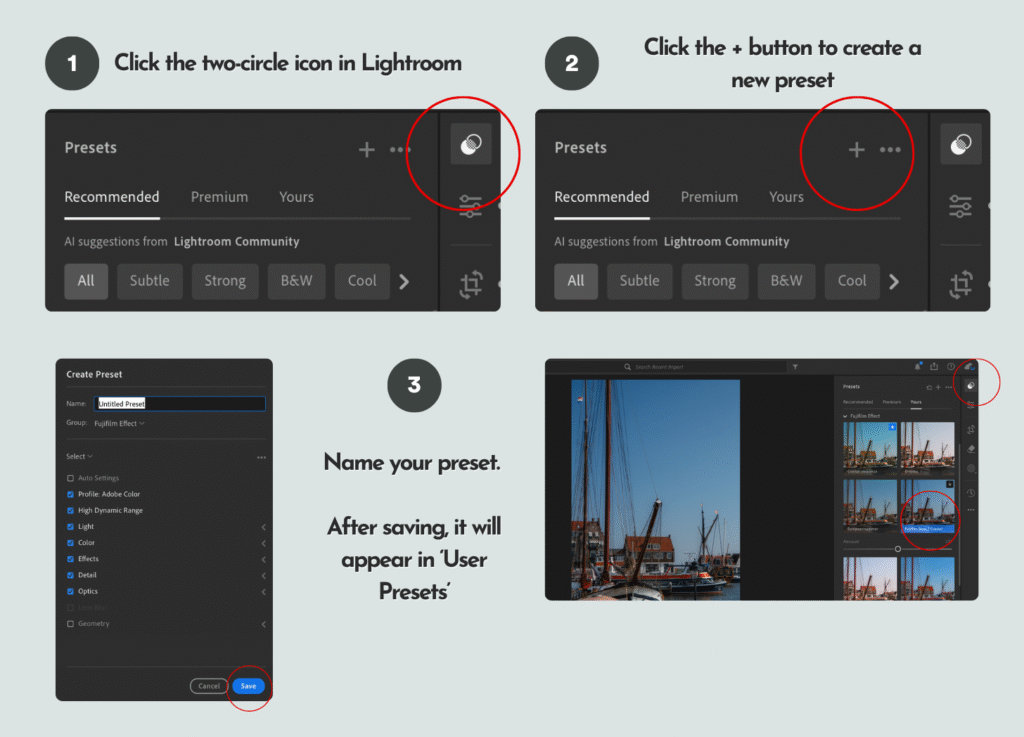
Once imported, the DNG files will appear in your Lightroom library as photos. Select one, then tap the two-circle “Presets” icon at the top right. Hit the + button to create a new preset, and give it a name (e.g., “Fujifilm Basic” or use the suggested names provided). After saving, it will appear under the User Presets section. Repeat this for each DNG file to save all your presets.
How to Edit Like a Pro Using Fujifilm Lightroom Presets
How to save a Lightroom preset in Adobe Lightroom

Import Your Photos in Lightroom

Next, import the photos you want to edit into Lightroom either on your mobile or desktop. To stay organised, create albums or folders (e.g., portraits, landscapes, or trip name) so you can easily find your photos for later.

Choose the Photo You Want to Edit

For best results, use RAW files since they hold more image data. If you’re using JPEG or PNG photos from your phone or camera, choose ones that are well-lit and naturally exposed—these work best with Lightroom presets.

How to Edit Like a Pro Using Fujifilm Lightroom PresetsHow to Edit Like a Pro Using Fujifilm Lightroom Presets
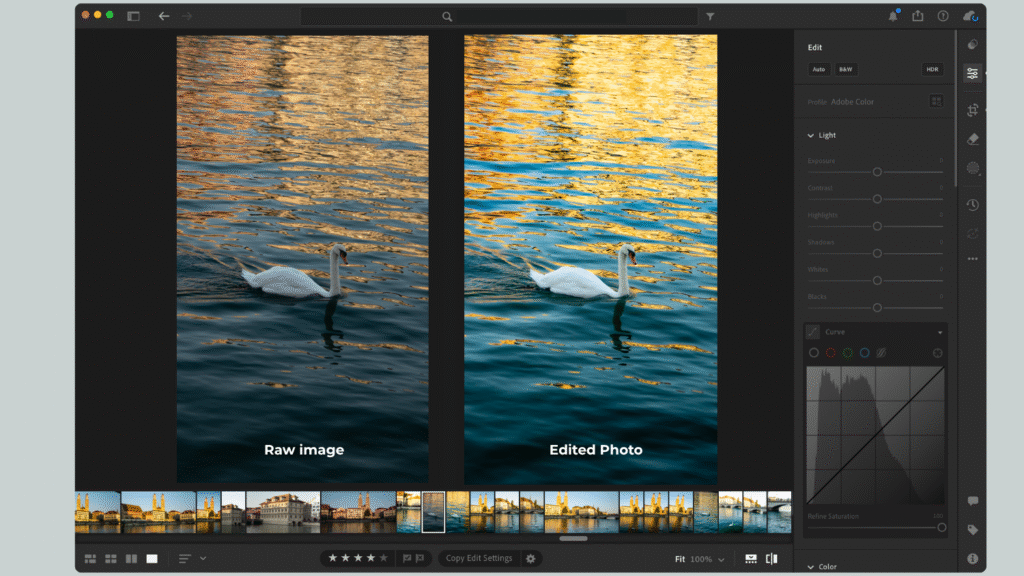
RAW image vs edited photo using Fujifilm Lightroom Preset

📸 Ready to take your photography to the next level? Whether you’re just starting out or looking to sharpen your skills, my free 30-page photography guide is packed with practical tips, editing tricks, and step-by-step advice to help you grow as a photographer.

Apply the Fujifilm Lightroom Presets

Once you’ve selected a photo, tap the Presets icon and choose the one you saved earlier under “User Presets.” Apply it in one click to transform your photo.

If you’re using my Fujifilm Lightroom Presets, they’re especially effective for natural light shots, travel photography, and portraits where you want warmth, depth, and that signature film-like feel.
How to Edit Like a Pro Using Fujifilm Lightroom Presets
Example edit of a RAW photo using the Fujifilm Lightroom Preset Basic.

Top Tips for Editing with Lightroom Presets

Getting the most out of your Lightroom Presets is all about knowing how to fine-tune them for your photos. Presets give you a strong starting point, but a little extra adjustment will make your edits look polished and natural. Here are some top tips to help you edit like a pro:

Shooting in RAW

If your camera allows it, always shoot in RAW format. RAW files contain much more image data compared to JPEGs, which gives you far greater flexibility when applying presets. This means you’ll have more control over colours, shadows, and highlights—ensuring your Fujifilm presets look their best.
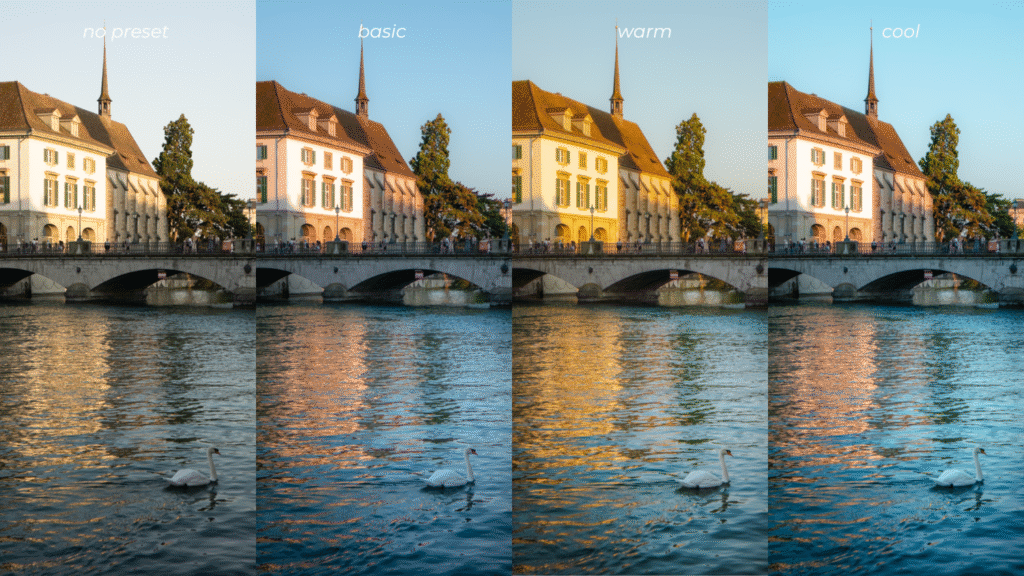
How to Edit Like a Pro Using Fujifilm Lightroom Presets
Raw photo (pictured on the left) edited using the three presets from the Fujifilm Lightroom Preset Bundle.

Adjust Exposure First

Exposure should always be your first stop. Even the best preset won’t look right if your photo is too dark or overexposed. Move the exposure slider until your photo feels balanced and natural, then continue making other adjustments. This simple step often makes a huge difference.

Adjust the Temperature

One of the hallmarks of Fujifilm’s film look is its warm, nostalgic tones. Try shifting the temperature slider slightly warmer to enhance this effect. On the other hand, cooler tones can create a moody, cinematic feel—perfect if you’re experimenting with different atmospheres in your photography.

Batch Edit for Consistency

Add Your Personal Touch

If you’re editing a full set of photos—like from a trip, event, or portrait shoot—save time by batch editing. Apply your chosen Fujifilm preset to one photo, then sync the edits across multiple images. This not only speeds up your workflow but also gives your gallery a cohesive and professional look.

Presets are designed as a foundation, but the magic happens when you make them your own. Don’t be afraid to fine-tune saturation, contrast, or clarity to suit your style. Want a more vintage vibe? Add a touch of grain. Prefer modern and clean? Pull back on shadows and clarity. These subtle adjustments help your edits stand out and reflect your unique eye as a photographer.

Sample Photos Using Fujifilm Lightroom Presets

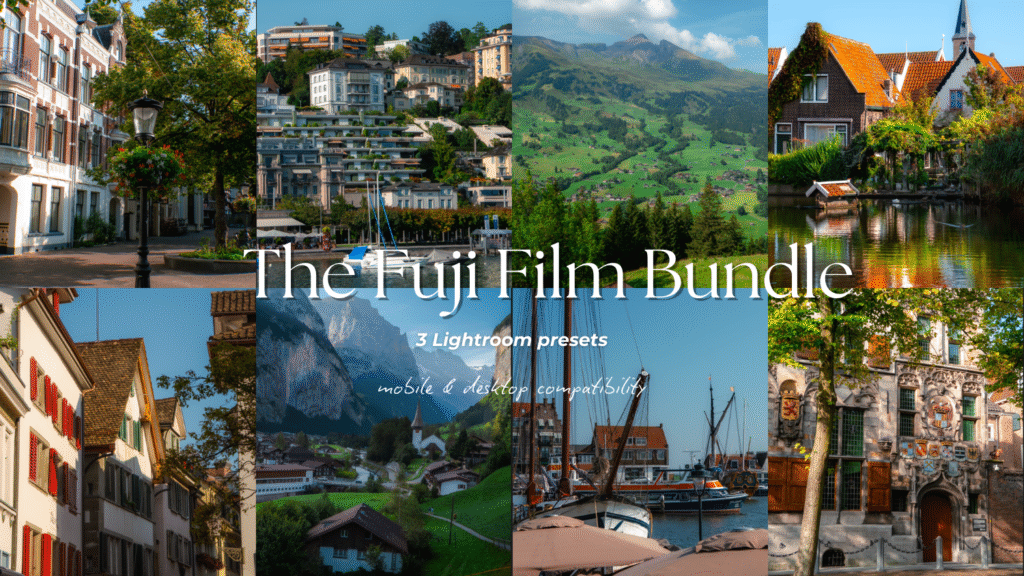
Here are a few sample photos edited with my Fujifilm Lightroom Preset Bundle. This bundle includes three presets—Basic, Warm, and Cool—crafted to emulate the signature Fujifilm look and adjust beautifully to different lighting conditions throughout the day.

The first photo was edited using the Fujifilm Basic Preset, which you can download individually or as part of the full bundle. This preset gives your photos a clean, true-to-life finish while enhancing colours in a way that reflects Fujifilm’s timeless tones.
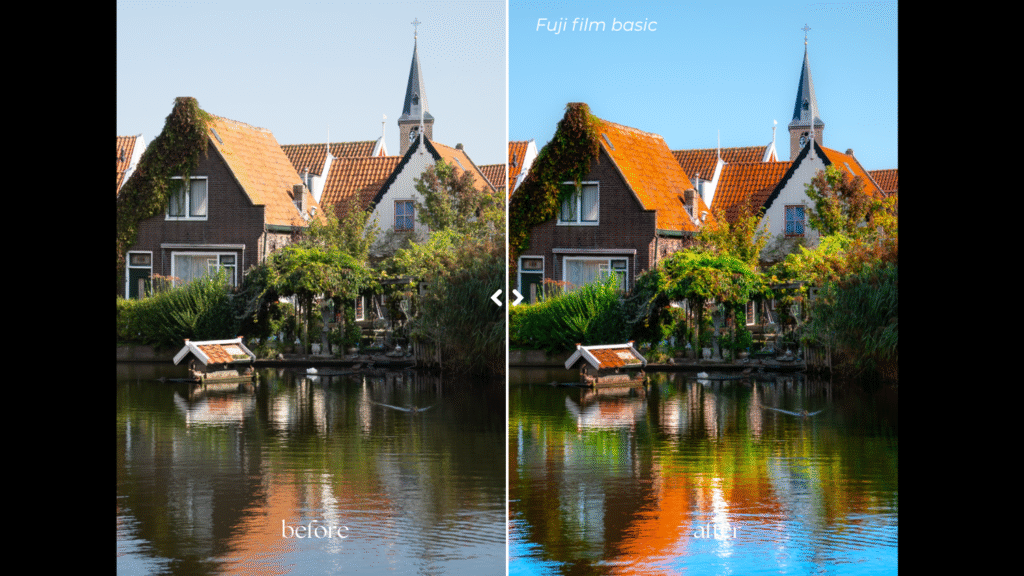
How to Edit Like a Pro Using Fujifilm Lightroom Presets
Edited using the Fujifilm Lightroom Preset (Basic)

The next photo was edited with the Fujifilm Warm Preset, designed to bring out rich natural colours and amplify the glow of sunlight, perfect for those golden midday shots or during golden hour.
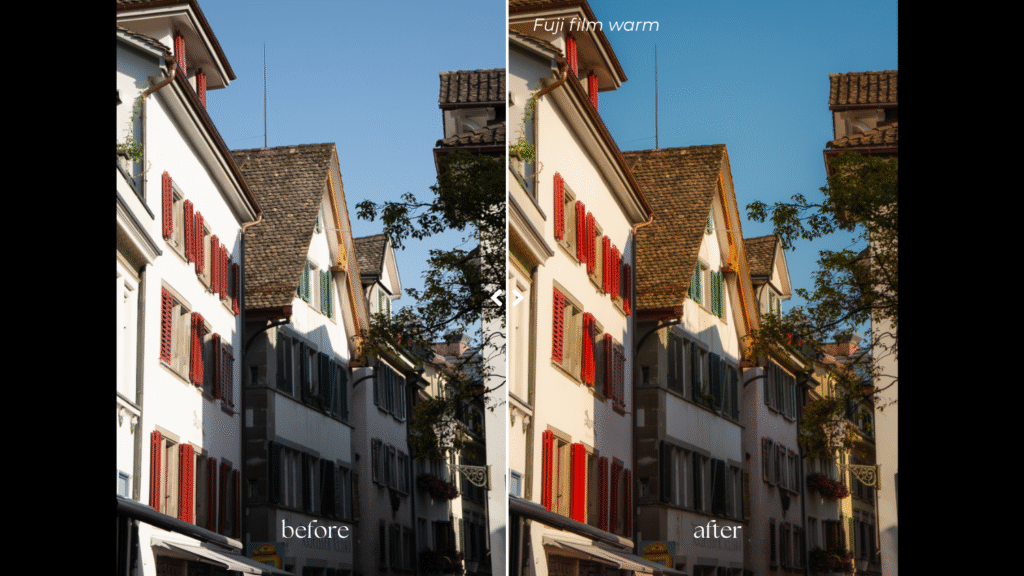
How to Edit Like a Pro Using Fujifilm Lightroom Presets
Edited using the Fujifilm Lightroom Preset (Warm)

Finally, here’s a side-by-side comparison of an unedited RAW image and the same photo transformed using all three Fujifilm Lightroom presets—showing just how effortlessly they capture that iconic Fujifilm aesthetic.
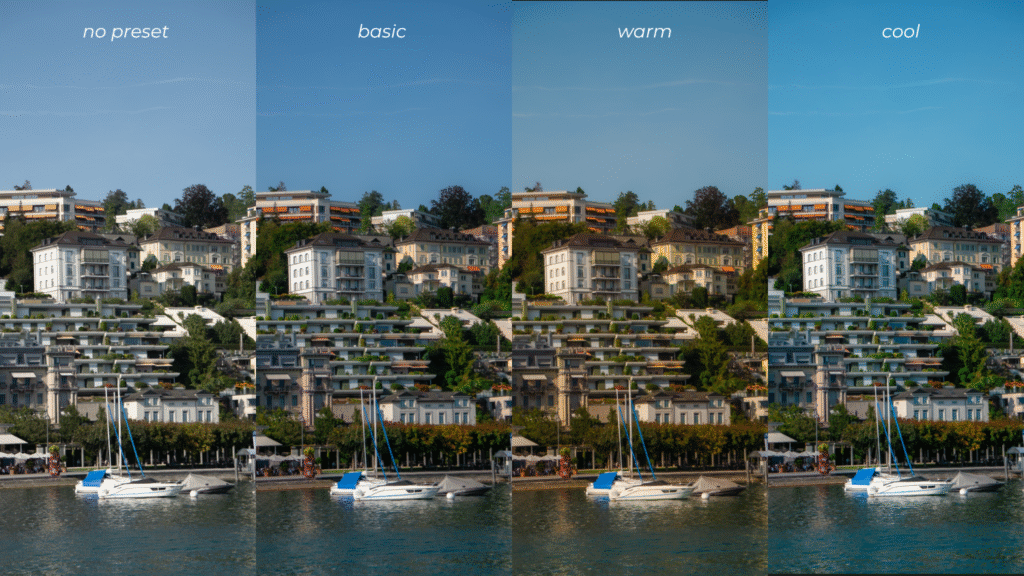
How to Edit Like a Pro Using Fujifilm Lightroom Presets
Photo editing comparison using the Fujifilm Lightroom Preset Bundle.

Download Fujifilm Lightroom Presets

If you love the look of these edits, you can easily achieve the same results in your own photos by downloading the Fujifilm Lightroom Preset Bundle. Whether you’re capturing landscapes, portraits, or everyday moments, these presets make it simple to add that classic Fujifilm vibe to every shot—saving you time while making your images pop.

Download here

Unlock 10% off my digital products when you sign up for my newsletter.
How to Edit Like a Pro Using Fujifilm Lightroom Presets

Other Resources You Might Find Helpful

  • Ultimate Female Travel Essentials List for International Travel
  • How to Take Photos of Yourself as a Female Solo Traveller
  • My Travel Photography Gear I Never Leave the House Without

Helpful Resources for You

✨ Edit smarter, not harder — speed up your workflow with my best-selling Fujifilm Lightroom Presets and give your photos a professional finish in just one click.

📸 Take your photography further — download my free 30+ page Photography Guide packed with exclusive tips, editing tricks, and practical advice to help you grow.

💡 Invest wisely in your gear — discover my go-to camera equipment that’s genuinely worth the money and has made the biggest difference in my photography.

💵 Earn cashback shopping online with your favourite brands through Shopback ($20 bonus when you sign up) or TopCashback ($50 bonus when you sign up)

Found this helpful? 👇🏼

Support my work by buying me a coffee so I can produce more free content for you.


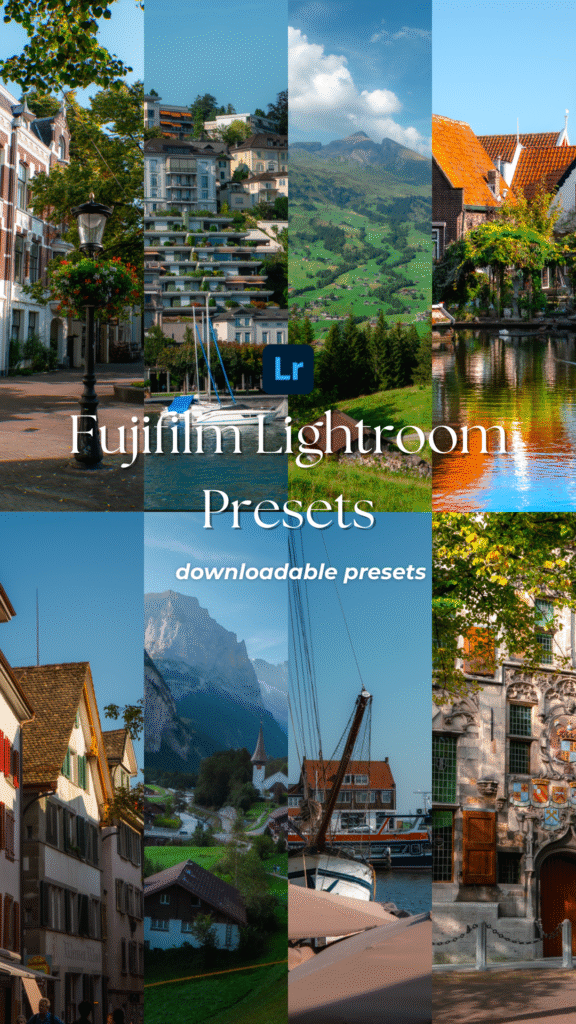
📌 Click on the pin to save ‘Fujifilm Lightroom Presets‘ for later.
How to Edit Like a Pro Using Fujifilm Lightroom Presets
share tweet share pin post share

Posted By: kellytoday · In: Blog, Photography

30 Best Books to Read in Your 20s for Females
Where to Stay in Fukuoka: 5 Best Areas & Hotels for Every Budget

You’ll Also Love

Best Travel Gear for Content Creation in 2023Best Travel Photography Gear Worth Your Money
How To Take Photos Of Yourself as a Solo TravellerHow To Take Photos Of Yourself as a Solo Traveller
Step-By-Step Process to Travel Content Creation

Leave a Reply Cancel reply

You must be logged in to post a comment.

Hi, I'm Kelly! I'm an Asian Australian content creator from Western Australia. I inspire others to get outside and explore the world. Join my adventures and discover my best travel & photography tips!

Map Travel Guide

Map Travel Guide

Join the community!

Subscribe to access the latest travel tips, discount codes & updates about group trips & product releases!

Follow me on IG @kellytoday

Part 2 of small habits that have helped me reduce Part 2 of small habits that have helped me reduce my screen time in my twenties 📱🧠

Since so many of you enjoyed part one, here’s a follow-up post on small habits that have genuinely helped me spend less time scrolling on my phone.

If you’re trying to cut down on screen time too, swipe through for a few ideas you might want to try 👀

💭 Found this helpful? Comment “list” and I’ll send you my full guide of offline ideas, habits, and resources ✨

📌 Extra information about products and resources featured:

📷 Lightroom presets are linked in my bio.

💌 I send out a weekly newsletter every Monday or Sunday depending on your timezone (sign up via the link in my bio).

📚 Reading stats are from @the.storygraph

📝 You can explore more posts from this series over on my Substack:

👩🏻‍💻 Guide to finding long-form content 
💸 How to start investing as a beginner
📱 Resources I use to replace my scrolling addiction

#twenties #habits #europe #netherlands
Part 3 of apps I’ve been using instead of endless Part 3 of apps I’ve been using instead of endless scrolling on my phone 📱

Some of these apps help me learn new things, some keep my brain active, and others simply remind me that technology can still feel calm and inspiring instead of overwhelming.

💌 Found this helpful? I share more resources like this in my weekly newsletter on Substack (you can sign up via the link in my bio).

💬 What’s an app, website, or online space you’ve been using lately?

#apps #habits #twenties
Let’s explore this side of Western Australia? 🌿💦 Let’s explore this side of Western Australia? 🌿💦

I’ve been slowly working through all the footage from a recent trip to Karijini National Park, and these are a few of my favourite frames from the three days spent there.

You could easily spend a week (or more) here hiking, swimming, and exploring the gorges at your own pace. There are trails for all levels — from gentle walks through to more challenging routes, depending on how adventurous you’re feeling. The spots featured in this carousel are part of the easier trails leading to Fortescue Falls and Fern Pool. If you’re after something more intense, there are also canyoning experiences and guided hiking tours that take you deeper into the gorges.🍃🥾

💭 Would this make it onto your #bucketlist?
📍 Karijini National Park in #westernaustralia 

🎥 Shot on @dji Osmo Pocket 4

#travel #cinematic #australiatravel @australiasnorthwest
🙇🏻‍♀️ Everything I've loved so far this month✨ A 🙇🏻‍♀️ Everything I've loved so far this month✨

A small wrap-up of the things, moments and favourites that have helped this month pass by.

You’ll find all the links to products and resources in the carousel (or below). 💭 I’d love to know — what have been some of your May favourites?

💌 I also share a weekly Monday newsletter where I dive deeper into the tips, resources, and small joys I’ve been discovering lately — you can sign up via the link in my bio.

📌 What’s featured this month:

💻 Favourite video essays I’ve been watching lately

🎧 Podcasts have been my favourite way to catch up on the news and stay on track with my reading goal.

📚 I’ve read 29 books so far this year and track my stats on @storygraph. I’m hoping to reach 60 this year.

🍁 Autumn is slowly coming to an end, so I’ve been spending more time outside. I usually take my @dji Osmo Pocket to capture video content.

💬 What are some of your monthly favourites from May? 

#monthlyfavourites #westernaustralia
🙇🏻‍♀️ Part 12 of media to read in your twenties ✨ 🙇🏻‍♀️ Part 12 of media to read in your twenties ✨

Here’s your next round of long-form reads for navigating your twenties.

💌 Enjoyed this post? I share weekly media recommendations (books, films, articles, podcasts & more) in my newsletter—link in bio if you’d like to join.

💡 Want even more? Check out my full “media to consume instead of doom-scrolling” series on my profile.

💭 Want the links for these articles? Sign up for my newsletter for the full list of articles + essays featured here.

#twenties #whattoread #articles
Autumn has to be one of my favourite times of year Autumn has to be one of my favourite times of year in Perth 🍂🍁

With the weather still feeling warm and sunny lately, I popped out at the last minute with my camera to enjoy the last of the autumn colours before they faded away.

Here are a few of my favourite frames from Hyde Park, capturing the autumn foliage and the birds enjoying the sunshine.

💬 What’s your favourite season of the year?
🎥 Shot on @djiglobal Osmo Pocket 4. 

#autumn #westernaustralia #perth #travelphotography
Micro-habits that have helped me reduce my screen Micro-habits that have helped me reduce my screen time in my twenties 📱 🧠

Since we’re somehow nearly halfway through the year already, here’s an updated version of the small habits that have genuinely helped me spend less time glued to my phone lately.🤳🏼

These are just a few tiny shifts that have helped me become more intentional with how I spend my time and attention.

💭 Found this helpful? Comment “list”, and I’ll send you my full guide of offline ideas, habits, and resources ✨

📌 You can explore more posts from the series over on my Substack & Instagram:

📽️ media to consume instead of doomscrolling

🙇🏻‍♀️ apps I use to replace my scrolling addiction

🧠 how to reclaim your attention span (Substack article)

#twenties #habits #japan
More apps I’ve been using instead of endlessly scr More apps I’ve been using instead of endlessly scrolling 🫶🏼📱

Part two because apparently there are quite a few little corners of the internet that still make being online feel intentional again.

Some of these apps help me learn new things, some keep my brain active, and others simply remind me that technology can still feel calm and inspiring instead of overwhelming.

💌 Found this helpful? I share more resources like this in my weekly newsletter on Substack (you can sign up via the link in my bio).

💬 What’s an app, website, or online space you’ve been using lately?

#apps #habits #digitaldetox
📝 Part 8 of the media I consumed this week that sp 📝 Part 8 of the media I consumed this week that sparked my curiosity 🙇🏻‍♀️

Here’s some media to help you be more intentional with your time — swap the doomscrolling for video essays and thoughtful articles that actually stay with you. 🌱

A roundup of what’s worth consuming when you want to learn something new and give your brain a little spark. ✨📚

💌 If this resonates, I share weekly recommendations (books, films, articles, podcasts + more) in my newsletter. You can sign up through the link in my bio.

💭 You can sign up for my newsletter to receive the full list of media featured here.

📝 Comment 'list' and I'll send you all the links for the media in this carousel.

#reading #whattoread #habits #europe

Travel More

Explore Categories

  • Free Resources
  • Blog
  • Travel
  • Travel Tips & Guides
  • Photography
  • Working Abroad

Support my work

Recent Posts

  • 15 Best Day Trips from Seoul & How To Get There
  • 20 Helpful Things to Know When Travelling to Japan
  • 10 Day Trips from Fukuoka That’s Worth Your Time
  • 13 Best Christmas Romance Books You’ll Want to Read in One Sitting
  • 16 Romance Books About Second Chances You’ll Wish You Read Sooner

travel more

300*250
Part 2 of small habits that have helped me reduce Part 2 of small habits that have helped me reduce my screen time in my twenties 📱🧠

Since so many of you enjoyed part one, here’s a follow-up post on small habits that have genuinely helped me spend less time scrolling on my phone.

If you’re trying to cut down on screen time too, swipe through for a few ideas you might want to try 👀

💭 Found this helpful? Comment “list” and I’ll send you my full guide of offline ideas, habits, and resources ✨

📌 Extra information about products and resources featured:

📷 Lightroom presets are linked in my bio.

💌 I send out a weekly newsletter every Monday or Sunday depending on your timezone (sign up via the link in my bio).

📚 Reading stats are from @the.storygraph

📝 You can explore more posts from this series over on my Substack:

👩🏻‍💻 Guide to finding long-form content 
💸 How to start investing as a beginner
📱 Resources I use to replace my scrolling addiction

#twenties #habits #europe #netherlands
Part 3 of apps I’ve been using instead of endless Part 3 of apps I’ve been using instead of endless scrolling on my phone 📱

Some of these apps help me learn new things, some keep my brain active, and others simply remind me that technology can still feel calm and inspiring instead of overwhelming.

💌 Found this helpful? I share more resources like this in my weekly newsletter on Substack (you can sign up via the link in my bio).

💬 What’s an app, website, or online space you’ve been using lately?

#apps #habits #twenties
Let’s explore this side of Western Australia? 🌿💦 Let’s explore this side of Western Australia? 🌿💦

I’ve been slowly working through all the footage from a recent trip to Karijini National Park, and these are a few of my favourite frames from the three days spent there.

You could easily spend a week (or more) here hiking, swimming, and exploring the gorges at your own pace. There are trails for all levels — from gentle walks through to more challenging routes, depending on how adventurous you’re feeling. The spots featured in this carousel are part of the easier trails leading to Fortescue Falls and Fern Pool. If you’re after something more intense, there are also canyoning experiences and guided hiking tours that take you deeper into the gorges.🍃🥾

💭 Would this make it onto your #bucketlist?
📍 Karijini National Park in #westernaustralia 

🎥 Shot on @dji Osmo Pocket 4

#travel #cinematic #australiatravel @australiasnorthwest
🙇🏻‍♀️ Everything I've loved so far this month✨ A 🙇🏻‍♀️ Everything I've loved so far this month✨

A small wrap-up of the things, moments and favourites that have helped this month pass by.

You’ll find all the links to products and resources in the carousel (or below). 💭 I’d love to know — what have been some of your May favourites?

💌 I also share a weekly Monday newsletter where I dive deeper into the tips, resources, and small joys I’ve been discovering lately — you can sign up via the link in my bio.

📌 What’s featured this month:

💻 Favourite video essays I’ve been watching lately

🎧 Podcasts have been my favourite way to catch up on the news and stay on track with my reading goal.

📚 I’ve read 29 books so far this year and track my stats on @storygraph. I’m hoping to reach 60 this year.

🍁 Autumn is slowly coming to an end, so I’ve been spending more time outside. I usually take my @dji Osmo Pocket to capture video content.

💬 What are some of your monthly favourites from May? 

#monthlyfavourites #westernaustralia
🙇🏻‍♀️ Part 12 of media to read in your twenties ✨ 🙇🏻‍♀️ Part 12 of media to read in your twenties ✨

Here’s your next round of long-form reads for navigating your twenties.

💌 Enjoyed this post? I share weekly media recommendations (books, films, articles, podcasts & more) in my newsletter—link in bio if you’d like to join.

💡 Want even more? Check out my full “media to consume instead of doom-scrolling” series on my profile.

💭 Want the links for these articles? Sign up for my newsletter for the full list of articles + essays featured here.

#twenties #whattoread #articles
Autumn has to be one of my favourite times of year Autumn has to be one of my favourite times of year in Perth 🍂🍁

With the weather still feeling warm and sunny lately, I popped out at the last minute with my camera to enjoy the last of the autumn colours before they faded away.

Here are a few of my favourite frames from Hyde Park, capturing the autumn foliage and the birds enjoying the sunshine.

💬 What’s your favourite season of the year?
🎥 Shot on @djiglobal Osmo Pocket 4. 

#autumn #westernaustralia #perth #travelphotography
Micro-habits that have helped me reduce my screen Micro-habits that have helped me reduce my screen time in my twenties 📱 🧠

Since we’re somehow nearly halfway through the year already, here’s an updated version of the small habits that have genuinely helped me spend less time glued to my phone lately.🤳🏼

These are just a few tiny shifts that have helped me become more intentional with how I spend my time and attention.

💭 Found this helpful? Comment “list”, and I’ll send you my full guide of offline ideas, habits, and resources ✨

📌 You can explore more posts from the series over on my Substack & Instagram:

📽️ media to consume instead of doomscrolling

🙇🏻‍♀️ apps I use to replace my scrolling addiction

🧠 how to reclaim your attention span (Substack article)

#twenties #habits #japan
More apps I’ve been using instead of endlessly scr More apps I’ve been using instead of endlessly scrolling 🫶🏼📱

Part two because apparently there are quite a few little corners of the internet that still make being online feel intentional again.

Some of these apps help me learn new things, some keep my brain active, and others simply remind me that technology can still feel calm and inspiring instead of overwhelming.

💌 Found this helpful? I share more resources like this in my weekly newsletter on Substack (you can sign up via the link in my bio).

💬 What’s an app, website, or online space you’ve been using lately?

#apps #habits #digitaldetox
  • Disclosure
  • Privacy Policy
  • Terms & Conditions

Copyright © 2026 Kelly Today · Theme by 17th Avenue