• Home
  • Blog
    • Travel Tips & Guides
    • Working Abroad
    • Photography
    • Books
  • Travel
    • Europe
    • South Korea
    • Japan
    • Australia
      • Western Australia
  • Free Resources
  • Shop
  • Portfolio
  • About
    • About Me
    • Frequently Asked Questions
  • Work with Me

Explore

  • Work With Me
  • About Me
  • Shop
  • Blog

Connect

Kelly Today

Blog, Photography · October 4, 2025

How to Edit Like a Pro Using Fujifilm Lightroom Presets

share tweet share pin post share

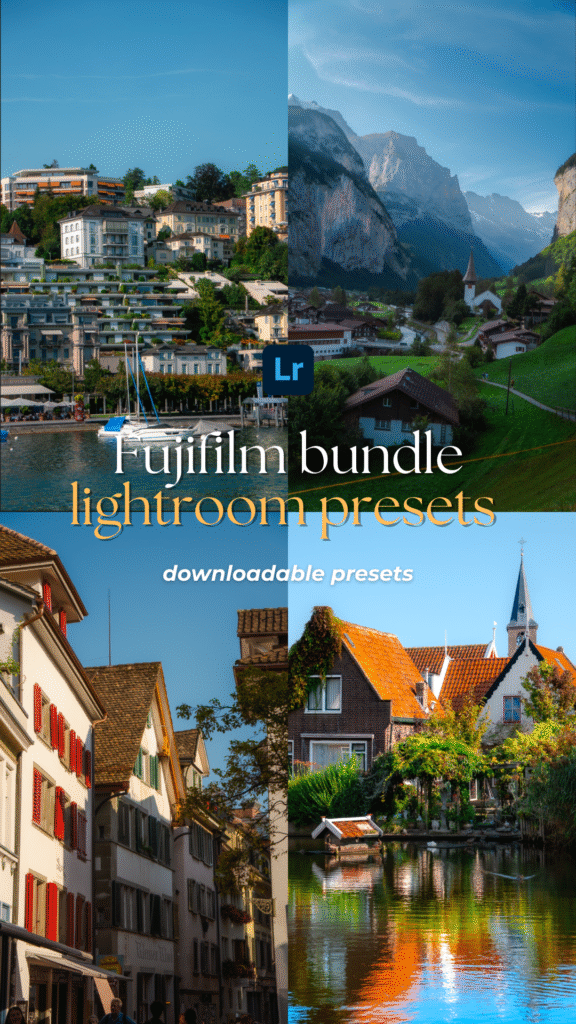
Editing is one of the most rewarding parts of photography, but it can also feel overwhelming when you’re just starting out. With endless sliders, tones, and adjustments in Lightroom, knowing where to begin isn’t always easy. That’s where Fujifilm Lightroom Presets come in.

Inspired by Fujifilm’s iconic film simulations, these presets give your photos a timeless, film-like aesthetic in just one click—whether you’re shooting travel, portraits, or everyday moments. The best part? They save you time while still leaving room for your own creative touch.

In this guide, I’ll walk you through how to install and use Fujifilm Lightroom Presets, along with practical editing tips to help you get the most out of them. Whether you’re new to photography or looking to refine your editing workflow, these steps will help you edit with confidence and achieve professional results.

Disclaimer: This post may contain affiliate links, which means I get a small commission if you make a purchase (at no extra cost to you). It’s one of the ways I can keep producing free resources and guides for my readers. Thank you for your support! Refer to the Disclosure Policy for more details.

Contents hide
1 How to Start Editing with Lightroom Presets
1.1 Download and Install Your Lightroom Presets
1.2 Create and Save Your Lightroom Presets
1.3 Import Your Photos in Lightroom
1.4 Choose the Photo You Want to Edit
1.5 Apply the Fujifilm Lightroom Presets
2 Top Tips for Editing with Lightroom Presets
2.1 Shooting in RAW
2.2 Adjust Exposure First
2.3 Adjust the Temperature
2.4 Batch Edit for Consistency
2.5 Add Your Personal Touch
3 Sample Photos Using Fujifilm Lightroom Presets
4 Download Fujifilm Lightroom Presets

Short on time?

Here are my top recommendations for photography:

✨ Edit smarter, not harder — speed up your workflow with my best-selling Fujifilm Lightroom Presets and give your photos a professional finish in just one click.

📸 Take your photography further — download my free 30+ page Photography Guide packed with exclusive tips, editing tricks, and practical advice to help you grow.

💡 Invest wisely in your gear — discover my go-to camera equipment that’s worth the money and has made the biggest difference in my photography.

💵 Earn cashback shopping online with your favourite brands through Shopback ($20 bonus when you sign up) or TopCashback ($50 bonus when you sign up)

How to Start Editing with Lightroom Presets

If you’re new to presets, here’s a simple step-by-step guide to installing and using them in Lightroom. These steps can be followed after you’ve downloaded your Lightroom presets.

Download and Install Your Lightroom Presets

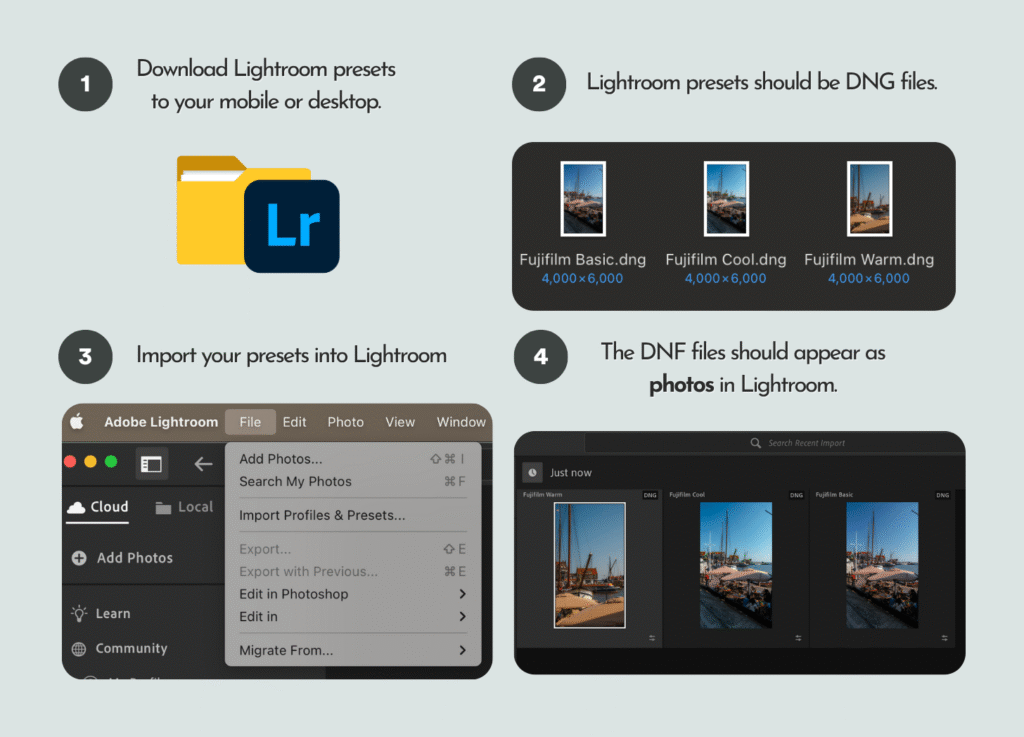
First, import your downloaded presets into Lightroom (desktop or mobile). The exact file format will depend on where you got them from. For example, the Fujifilm Lightroom Presets I’ve created come as DNG files, which can be imported directly into Lightroom as photos.

Tip: Adobe Lightroom is free on mobile, but a subscription is required for desktop use.
How to Edit Like a Pro Using Fujifilm Lightroom Presets
How to install Fujifilm Lightroom Presets in Adobe Lightroom

Create and Save Your Lightroom Presets

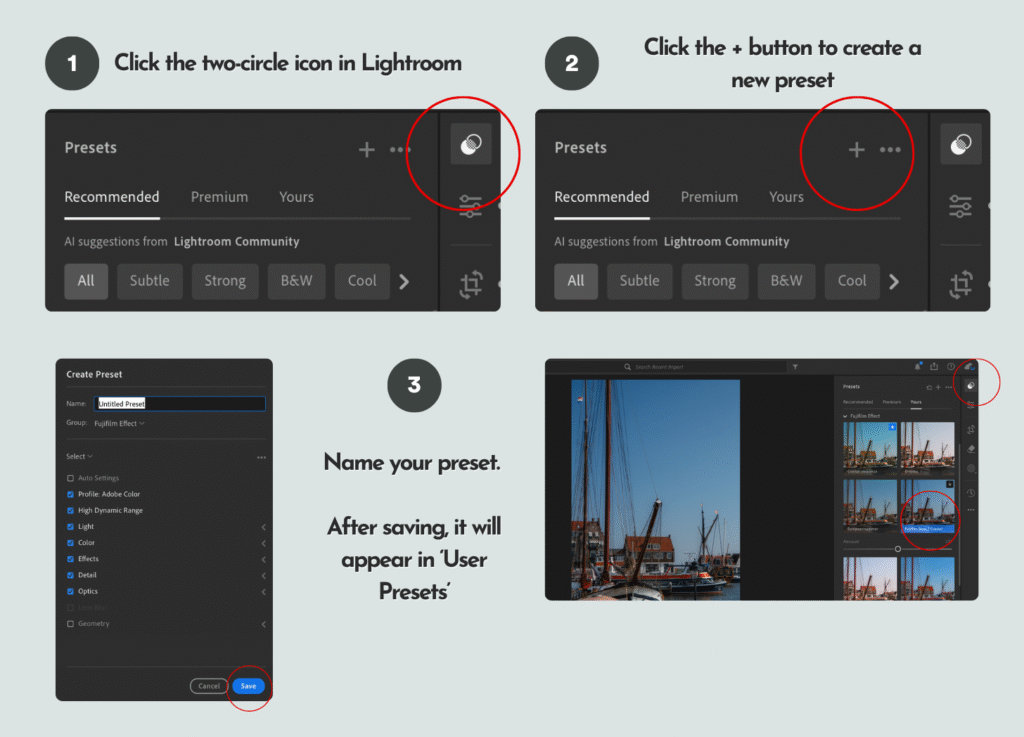
Once imported, the DNG files will appear in your Lightroom library as photos. Select one, then tap the two-circle “Presets” icon at the top right. Hit the + button to create a new preset, and give it a name (e.g., “Fujifilm Basic” or use the suggested names provided). After saving, it will appear under the User Presets section. Repeat this for each DNG file to save all your presets.
How to Edit Like a Pro Using Fujifilm Lightroom Presets
How to save a Lightroom preset in Adobe Lightroom

Import Your Photos in Lightroom

Next, import the photos you want to edit into Lightroom either on your mobile or desktop. To stay organised, create albums or folders (e.g., portraits, landscapes, or trip name) so you can easily find your photos for later.

Choose the Photo You Want to Edit

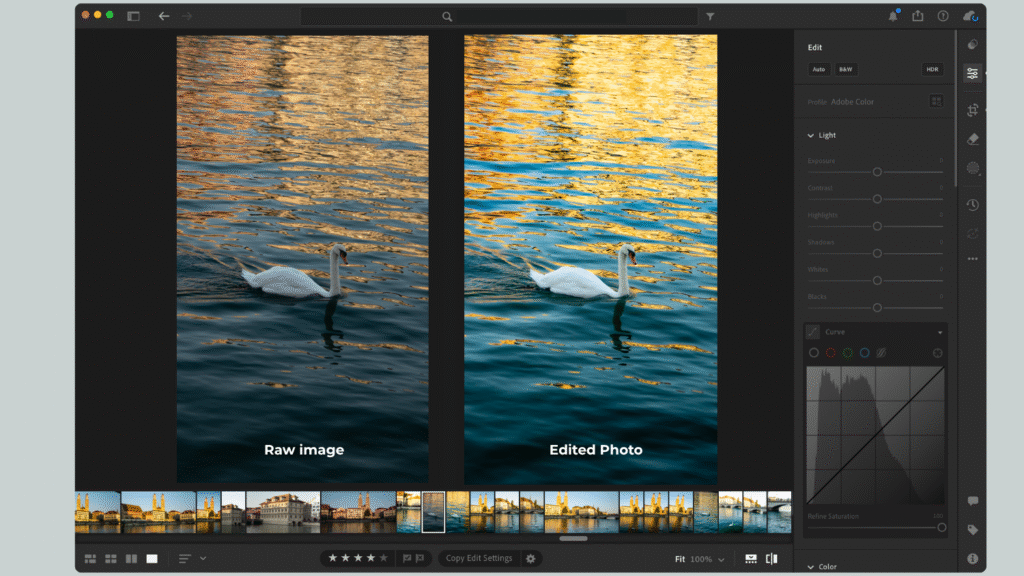
For best results, use RAW files since they hold more image data. If you’re using JPEG or PNG photos from your phone or camera, choose ones that are well-lit and naturally exposed—these work best with Lightroom presets.

How to Edit Like a Pro Using Fujifilm Lightroom PresetsHow to Edit Like a Pro Using Fujifilm Lightroom Presets
RAW image vs edited photo using Fujifilm Lightroom Preset

📸 Ready to take your photography to the next level? Whether you’re just starting out or looking to sharpen your skills, my free 30-page photography guide is packed with practical tips, editing tricks, and step-by-step advice to help you grow as a photographer.

Apply the Fujifilm Lightroom Presets

Once you’ve selected a photo, tap the Presets icon and choose the one you saved earlier under “User Presets.” Apply it in one click to transform your photo.

If you’re using my Fujifilm Lightroom Presets, they’re especially effective for natural light shots, travel photography, and portraits where you want warmth, depth, and that signature film-like feel.
How to Edit Like a Pro Using Fujifilm Lightroom Presets
Example edit of a RAW photo using the Fujifilm Lightroom Preset Basic.

Top Tips for Editing with Lightroom Presets

Getting the most out of your Lightroom Presets is all about knowing how to fine-tune them for your photos. Presets give you a strong starting point, but a little extra adjustment will make your edits look polished and natural. Here are some top tips to help you edit like a pro:

Shooting in RAW

If your camera allows it, always shoot in RAW format. RAW files contain much more image data compared to JPEGs, which gives you far greater flexibility when applying presets. This means you’ll have more control over colours, shadows, and highlights—ensuring your Fujifilm presets look their best.
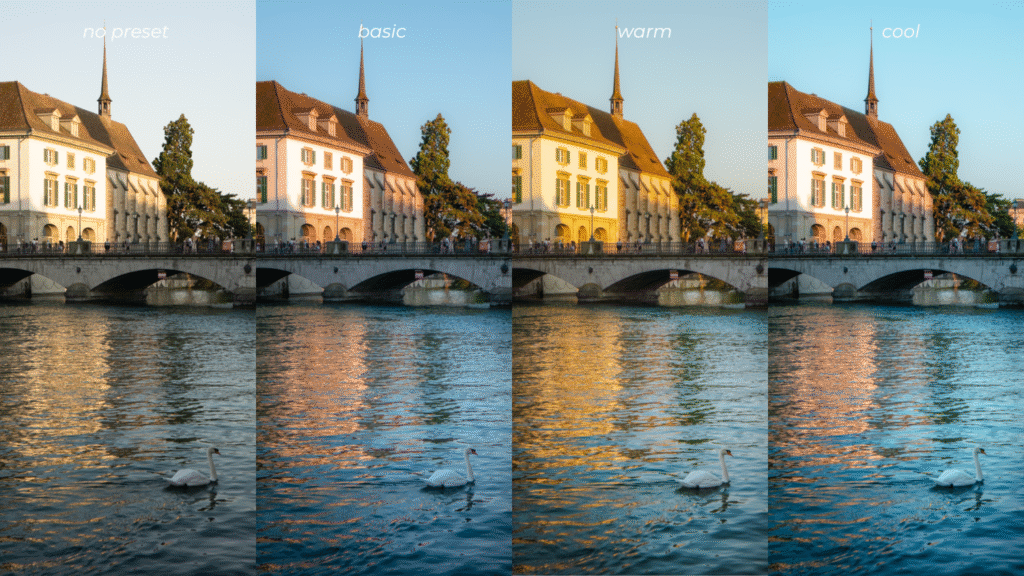
How to Edit Like a Pro Using Fujifilm Lightroom Presets
Raw photo (pictured on the left) edited using the three presets from the Fujifilm Lightroom Preset Bundle.

Adjust Exposure First

Exposure should always be your first stop. Even the best preset won’t look right if your photo is too dark or overexposed. Move the exposure slider until your photo feels balanced and natural, then continue making other adjustments. This simple step often makes a huge difference.

Adjust the Temperature

One of the hallmarks of Fujifilm’s film look is its warm, nostalgic tones. Try shifting the temperature slider slightly warmer to enhance this effect. On the other hand, cooler tones can create a moody, cinematic feel—perfect if you’re experimenting with different atmospheres in your photography.

Batch Edit for Consistency

Add Your Personal Touch

If you’re editing a full set of photos—like from a trip, event, or portrait shoot—save time by batch editing. Apply your chosen Fujifilm preset to one photo, then sync the edits across multiple images. This not only speeds up your workflow but also gives your gallery a cohesive and professional look.

Presets are designed as a foundation, but the magic happens when you make them your own. Don’t be afraid to fine-tune saturation, contrast, or clarity to suit your style. Want a more vintage vibe? Add a touch of grain. Prefer modern and clean? Pull back on shadows and clarity. These subtle adjustments help your edits stand out and reflect your unique eye as a photographer.

Sample Photos Using Fujifilm Lightroom Presets

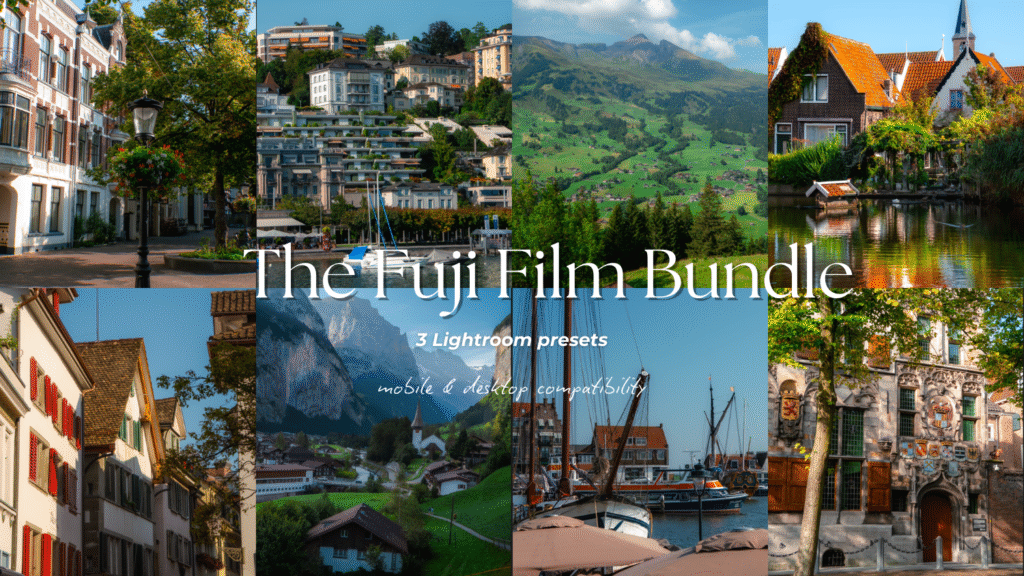
Here are a few sample photos edited with my Fujifilm Lightroom Preset Bundle. This bundle includes three presets—Basic, Warm, and Cool—crafted to emulate the signature Fujifilm look and adjust beautifully to different lighting conditions throughout the day.

The first photo was edited using the Fujifilm Basic Preset, which you can download individually or as part of the full bundle. This preset gives your photos a clean, true-to-life finish while enhancing colours in a way that reflects Fujifilm’s timeless tones.
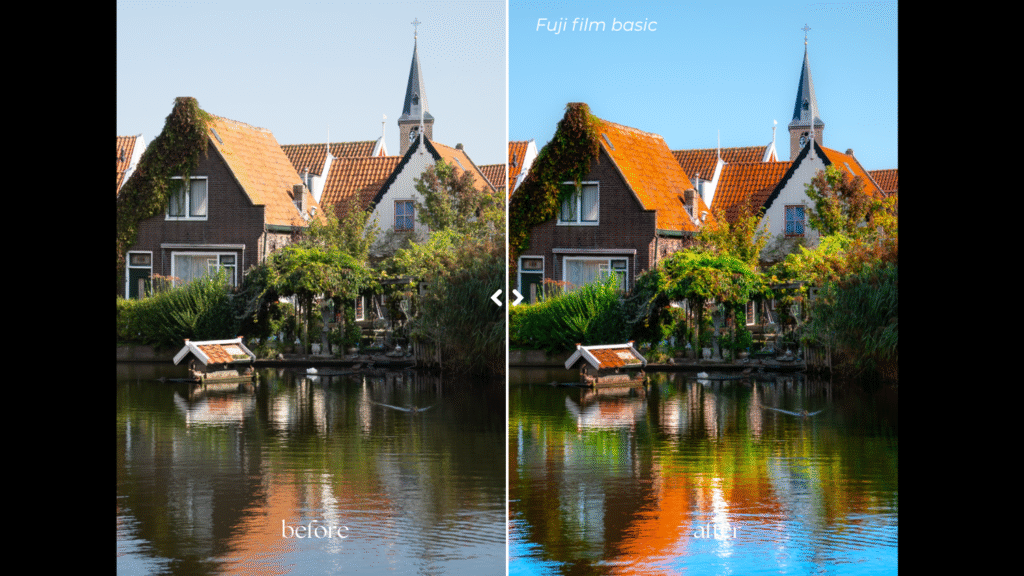
How to Edit Like a Pro Using Fujifilm Lightroom Presets
Edited using the Fujifilm Lightroom Preset (Basic)

The next photo was edited with the Fujifilm Warm Preset, designed to bring out rich natural colours and amplify the glow of sunlight, perfect for those golden midday shots or during golden hour.
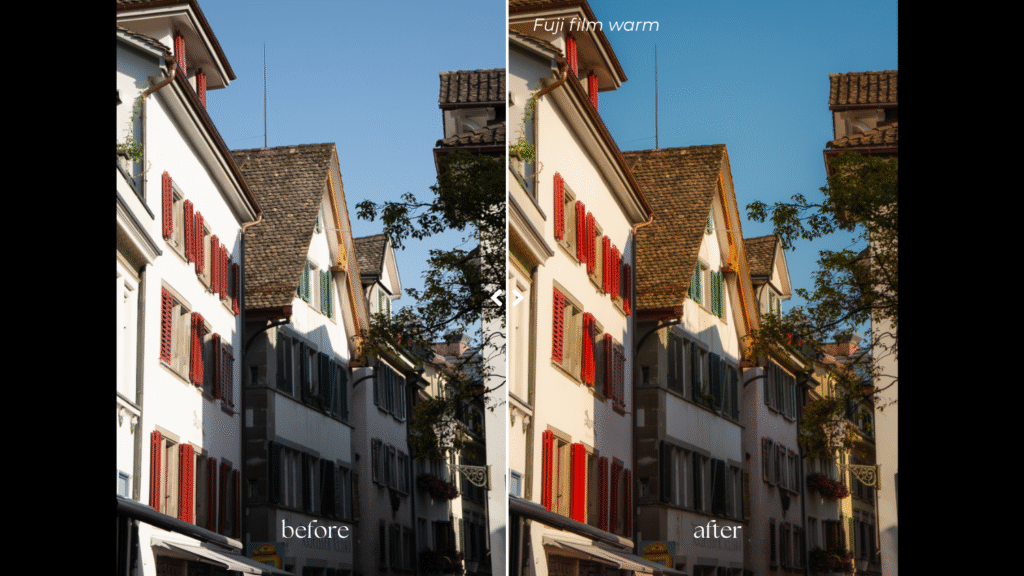
How to Edit Like a Pro Using Fujifilm Lightroom Presets
Edited using the Fujifilm Lightroom Preset (Warm)

Finally, here’s a side-by-side comparison of an unedited RAW image and the same photo transformed using all three Fujifilm Lightroom presets—showing just how effortlessly they capture that iconic Fujifilm aesthetic.
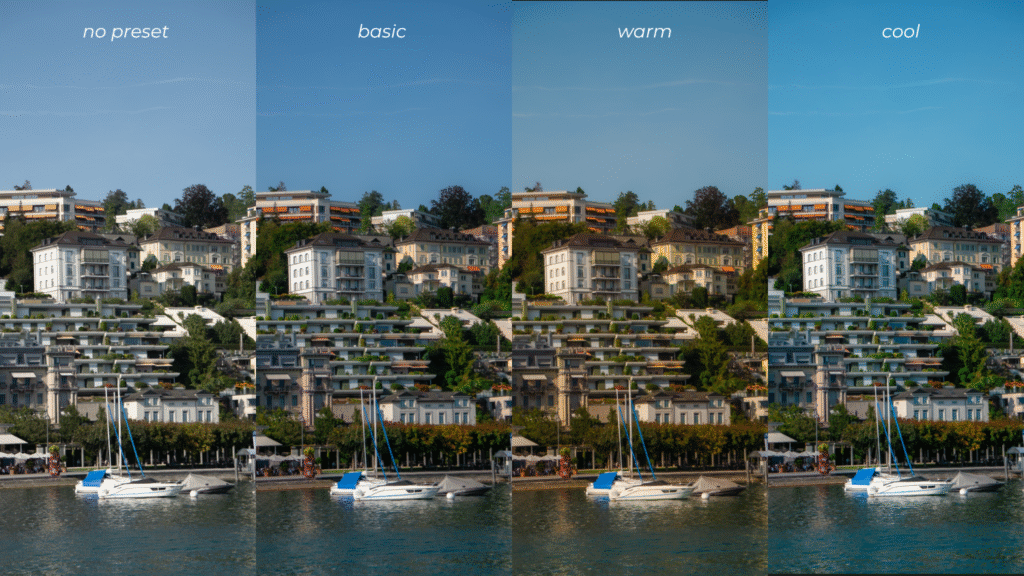
How to Edit Like a Pro Using Fujifilm Lightroom Presets
Photo editing comparison using the Fujifilm Lightroom Preset Bundle.

Download Fujifilm Lightroom Presets

If you love the look of these edits, you can easily achieve the same results in your own photos by downloading the Fujifilm Lightroom Preset Bundle. Whether you’re capturing landscapes, portraits, or everyday moments, these presets make it simple to add that classic Fujifilm vibe to every shot—saving you time while making your images pop.

Download here

Unlock 10% off my digital products when you sign up for my newsletter.
How to Edit Like a Pro Using Fujifilm Lightroom Presets

Other Resources You Might Find Helpful

  • Ultimate Female Travel Essentials List for International Travel
  • How to Take Photos of Yourself as a Female Solo Traveller
  • My Travel Photography Gear I Never Leave the House Without

Helpful Resources for You

✨ Edit smarter, not harder — speed up your workflow with my best-selling Fujifilm Lightroom Presets and give your photos a professional finish in just one click.

📸 Take your photography further — download my free 30+ page Photography Guide packed with exclusive tips, editing tricks, and practical advice to help you grow.

💡 Invest wisely in your gear — discover my go-to camera equipment that’s genuinely worth the money and has made the biggest difference in my photography.

💵 Earn cashback shopping online with your favourite brands through Shopback ($20 bonus when you sign up) or TopCashback ($50 bonus when you sign up)

Found this helpful? 👇🏼

Support my work by buying me a coffee so I can produce more free content for you.


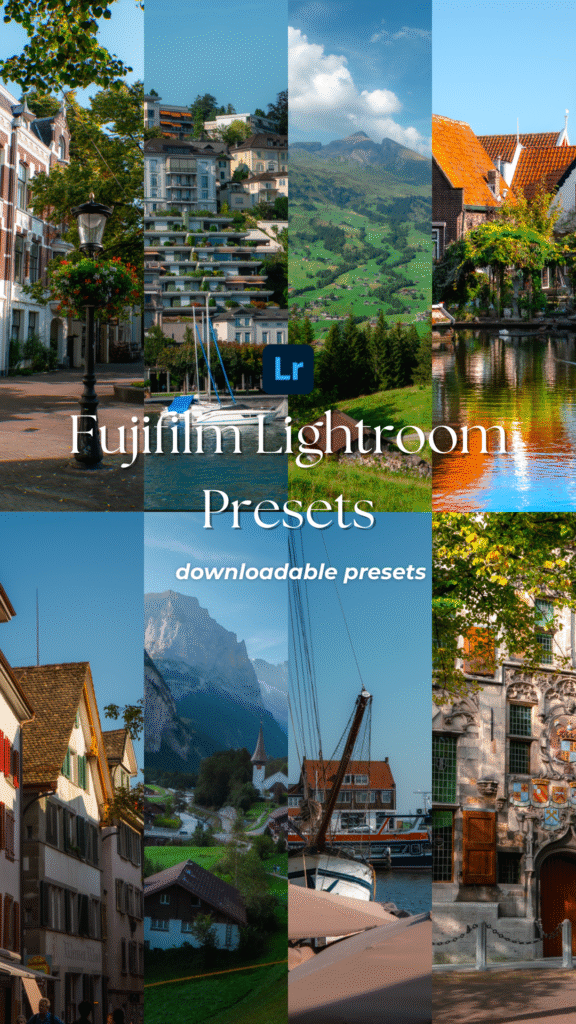
📌 Click on the pin to save ‘Fujifilm Lightroom Presets‘ for later.
How to Edit Like a Pro Using Fujifilm Lightroom Presets
share tweet share pin post share

Posted By: kellytoday · In: Blog, Photography

The Ultimate Female Travel Essentials List for International Travel
Where to Stay in Fukuoka: 5 Best Areas & Hotels for Every Budget

You’ll Also Love

How To Take Photos Of Yourself as a Solo TravellerHow To Take Photos Of Yourself as a Solo Traveller
Step-By-Step Process to Travel Content Creation
Best Travel Gear for Content Creation in 2023Best Travel Photography Gear Worth Your Money

Leave a Reply Cancel reply

You must be logged in to post a comment.

Hi, I'm Kelly! I'm an Asian Australian content creator from Western Australia. I inspire others to get outside and explore the world. Join my adventures and discover my best travel & photography tips!

Map Travel Guide

Map Travel Guide

Join the community!

Subscribe to access the latest travel tips, discount codes & updates about group trips & product releases!

Follow me on IG @kellytoday

Don't miss this souvenir in Japan💮📔 Forget the us Don't miss this souvenir in Japan💮📔

Forget the usual keychains or magnets—one of the most memorable souvenirs you can collect in Japan are eki stamps. They’re a fun (and free!) way to document your travels, with each design reflecting the history, culture, or characters of the location.

✨ Where can I find stamps in Japan?
You’ll spot them at train stations, temples, castles, popular tourist spots, and even specialty character stores.

✨ Where to get a stamp book? 
Bring your own notebook, or pick one up in Japan from stores like Itoya, Loft, or Tokyu Hands.

📌Tips for Collecting Stamps in Japan

① Always carry your notebook so you don’t miss one.

② Keep an eye out for limited edition stamps tied to seasonal events or anniversaries.

③ Most station stamps are near ticket gates—if you can’t find one, ask staff: eki stamp wa doko desu ka? or stampu arimasu ka?

④ Download the Stamp Quest app to help find locations (note: it doesn’t cover every stamp in Japan).

⑤ Treat it like a travel journal—it becomes a personalised keepsake of your journey.

📌 Want more Japan travel tips? My 3-week Japan itinerary is available for download. Comment itinerary and I'll send it to you.

💭 Have you collected any unique souvenirs during your travels in Japan? 

Unique souvenirs in Japan, things to do in Japan, free souvenirs in Japan

#Japan #Asia #traveltips #travelguide
I didn't expect a camera this small to handle this I didn't expect a camera this small to handle this much of my content. 👀

I’ve been using the DJI Osmo Pocket 4 over the past few weeks, and it’s quietly become my go-to camera for content creation — especially on days when I want cinematic footage without carrying extra gear.

For such a tiny camera, it delivers seriously high-quality 4K video, gives you full creative control with 10-bit D-Log, and makes filming solo feel effortless thanks to its subject tracking. It’s compact, lightweight, and genuinely easy to use — which means I actually reach for it more.

Here are my favourite features of the DJI Osmo Pocket 4:

🎥 3-axis gimbal stabilisation — smooth, steady footage that stays locked on your subject

🎨 Enhanced image quality — rich colours, depth, and detail for a cinematic look

🌙 1-inch CMOS sensor — makes filming in low light so much easier

🎞️ 10-bit D-Log support — more flexibility when colour grading

🔍 4K recording with 2× zoom — plus ActiveTrack for steadier, stress-free filming

🐢 4K slow motion at 240fps — perfect for cinematic moments

👤 ActiveTrack 7.0 — face tracking that keeps you centred, ideal for solo creators

🤳🏼 Built-in filters with fill light for soft, glowing skin straight from the camera. Includes film-inspired tones and beauty filters that make portraits look polished without over-editing.

🎒 Compact & lightweight — fits easily into a pocket or small bag

It’s the kind of camera that works *with* you — whether you’re vlogging, travelling, or creating on the go.

💬 Would you try the DJI Osmo Pocket 4?

If you’ve got questions, drop them in the comments — happy to share more 🤍

#DJIPocket4 #VideoCamera #DigitalCamera #CinematicVideo #ContentCreation @djiglobal @djistoreau
What if the prettiest canals in the Netherlands ar What if the prettiest canals in the Netherlands aren’t in Amsterdam… but just 30 minutes away? 👀

Swipe through, and you’ll see why this might just be the Netherlands’ most underrated spot to explore.

There’s something about this city that invites you to slow down. Maybe it’s the quiet canals lined with 17th-century buildings, or the way you stumble into hidden hofjes (courtyards) without even trying 🌿

It’s where Rembrandt van Rijn grew up, where science once thrived at its historic university, and where even the walls whisper stories (yes, including Albert Einstein’s equations) 🧠

💡 Save this for your next Netherlands trip:

 – Wander through secret courtyard gardens tucked behind old gates, where stepping inside feels like entering a quieter, hidden version of the city 🌿

 – Visit the beautiful Hortus Botanicus Leiden, Europe’s oldest botanical garden, filled with glasshouses, rare plants, and peaceful corners to linger in 🌷

 – Get lost along the canals with no real plan, letting cobblestone streets and charming bridges lead you until golden hour paints everything in soft light

 – End the day with a drink by the water, finding a cosy spot to sit as boats drift past and the city slowly winds down 🍷

Softer than Amsterdam. Quieter. A little more personal. The kind of place where every corner feels like it’s waiting to be discovered.

Welcome to Leiden 🎨🚤

💭 Would you add this place to your #bucketlist?

📷 photos taken on @sony A6400 camera and @tamronaus lens. Edited using my Lightroom presets (linked in bio)

#europe #netherlands #travelphotography #madewithlightroom  @lightroom @visitnetherlands
📝 Part 7 of the media I consumed this week that sp 📝 Part 7 of the media I consumed this week that sparked my curiosity 🙇🏻‍♀️

Here’s some media to help you be more intentional with your time — swap the doomscrolling for video essays and thoughtful articles that actually stay with you. 🌱

A roundup of what’s worth consuming when you want to learn something new and give your brain a little spark. ✨📚

💌 If this resonates, I share weekly recommendations (books, films, articles, podcasts + more) in my newsletter. You can sign up through the link in my bio.

💭 You can sign up for my newsletter to receive the full list of media featured here.

📝 Comment 'list' and I'll send you all the links for the media in this carousel.

#reading #whattoread #habits
The best sunset spot can be found in Portugal 🌅 # The best sunset spot can be found in Portugal 🌅

#europe #sunset #bucketlist #nature #portugal
Can you guess where this is? 📍Kyushu, Japan #j Can you guess where this is? 

📍Kyushu, Japan 

#japan #asia #frieren #bucketlist
Sharing a handful of my favourite photos I’ve take Sharing a handful of my favourite photos I’ve taken across my twenties — moments captured while travelling through Asia and Europe, nothing staged, nothing generated, just as they were.

Earlier this year, the head of Instagram mentioned how widespread AI has become, to the point where it’s getting harder to tell what’s real and what isn’t. And honestly, you can feel it. So much of what we see now is polished, perfected, and sometimes… not even real.

Somewhere along the way, content started to feel less like memories and more like output.

One of my quiet goals this year has been to create more than I consume. To step away from chasing trends, obsessing over analytics, and trying to keep up with whatever the algorithm favours that week.

I’ve been enjoying creating things that don’t always get posted — writing more, documenting more, keeping moments just for myself.

But this felt like something worth sharing.

So if this somehow made its way to you, here are a few real moments I’ve captured over the years

💭 Which photo is your favourite? 

📷 Shot on @sony camera and @tamronaus lens. Edited using my @lightroom presets (linked in my bio)

#europe #travelphotography #bucketlist #lightroom #madewithlightroom
Would you visit this country? Here's a few of my Would you visit this country? 

Here's a few of my favourite places I've visited in Switzerland on my one week trip. This was taken during the end of August and beginning of September. 

💬 Have you ever visited Switzerland? 
🗺 Comment 'SWITZERLAND' and i'll send you my 7 day itinerary for switzerland. 

📷 Photos were taken on @sony and edited on @lightroom using my presets (linked in bio) 

#europe #switzerland #bucketlist #travelphotography
Would you travel all the way to Switzerland to see Would you travel all the way to Switzerland to see this? 🏔🥾🪂🏞🍃

Here's a few of my favourite places I've visited in Switzerland on my one week trip. This was taken during the end of August and beginning of September. 

💬 Have you ever visited Switzerland? 
🗺 Comment 'SWITZERLAND' and i'll send you my 7 day itinerary for switzerland. 

📷 Photos were taken on @sony and edited on @lightroom using my presets (linked in bio) 

#bucketlist #europe #travelphotography #switzerland #lightroom

Travel More

Explore Categories

  • Free Resources
  • Blog
  • Travel
  • Travel Tips & Guides
  • Photography
  • Working Abroad

Support my work

Recent Posts

  • 10 Day Trips from Fukuoka That’s Worth Your Time
  • 20 Helpful Things to Know When Travelling to Japan
  • 10 Best Things to Do in Zurich You Can’t Miss
  • 10 Autumn Romance Books to Cosy Up With This Season
  • 15 Best Friends to Lovers Romance Books To Add To Your Reading List

travel more

300*250
Don't miss this souvenir in Japan💮📔 Forget the us Don't miss this souvenir in Japan💮📔

Forget the usual keychains or magnets—one of the most memorable souvenirs you can collect in Japan are eki stamps. They’re a fun (and free!) way to document your travels, with each design reflecting the history, culture, or characters of the location.

✨ Where can I find stamps in Japan?
You’ll spot them at train stations, temples, castles, popular tourist spots, and even specialty character stores.

✨ Where to get a stamp book? 
Bring your own notebook, or pick one up in Japan from stores like Itoya, Loft, or Tokyu Hands.

📌Tips for Collecting Stamps in Japan

① Always carry your notebook so you don’t miss one.

② Keep an eye out for limited edition stamps tied to seasonal events or anniversaries.

③ Most station stamps are near ticket gates—if you can’t find one, ask staff: eki stamp wa doko desu ka? or stampu arimasu ka?

④ Download the Stamp Quest app to help find locations (note: it doesn’t cover every stamp in Japan).

⑤ Treat it like a travel journal—it becomes a personalised keepsake of your journey.

📌 Want more Japan travel tips? My 3-week Japan itinerary is available for download. Comment itinerary and I'll send it to you.

💭 Have you collected any unique souvenirs during your travels in Japan? 

Unique souvenirs in Japan, things to do in Japan, free souvenirs in Japan

#Japan #Asia #traveltips #travelguide
I didn't expect a camera this small to handle this I didn't expect a camera this small to handle this much of my content. 👀

I’ve been using the DJI Osmo Pocket 4 over the past few weeks, and it’s quietly become my go-to camera for content creation — especially on days when I want cinematic footage without carrying extra gear.

For such a tiny camera, it delivers seriously high-quality 4K video, gives you full creative control with 10-bit D-Log, and makes filming solo feel effortless thanks to its subject tracking. It’s compact, lightweight, and genuinely easy to use — which means I actually reach for it more.

Here are my favourite features of the DJI Osmo Pocket 4:

🎥 3-axis gimbal stabilisation — smooth, steady footage that stays locked on your subject

🎨 Enhanced image quality — rich colours, depth, and detail for a cinematic look

🌙 1-inch CMOS sensor — makes filming in low light so much easier

🎞️ 10-bit D-Log support — more flexibility when colour grading

🔍 4K recording with 2× zoom — plus ActiveTrack for steadier, stress-free filming

🐢 4K slow motion at 240fps — perfect for cinematic moments

👤 ActiveTrack 7.0 — face tracking that keeps you centred, ideal for solo creators

🤳🏼 Built-in filters with fill light for soft, glowing skin straight from the camera. Includes film-inspired tones and beauty filters that make portraits look polished without over-editing.

🎒 Compact & lightweight — fits easily into a pocket or small bag

It’s the kind of camera that works *with* you — whether you’re vlogging, travelling, or creating on the go.

💬 Would you try the DJI Osmo Pocket 4?

If you’ve got questions, drop them in the comments — happy to share more 🤍

#DJIPocket4 #VideoCamera #DigitalCamera #CinematicVideo #ContentCreation @djiglobal @djistoreau
What if the prettiest canals in the Netherlands ar What if the prettiest canals in the Netherlands aren’t in Amsterdam… but just 30 minutes away? 👀

Swipe through, and you’ll see why this might just be the Netherlands’ most underrated spot to explore.

There’s something about this city that invites you to slow down. Maybe it’s the quiet canals lined with 17th-century buildings, or the way you stumble into hidden hofjes (courtyards) without even trying 🌿

It’s where Rembrandt van Rijn grew up, where science once thrived at its historic university, and where even the walls whisper stories (yes, including Albert Einstein’s equations) 🧠

💡 Save this for your next Netherlands trip:

 – Wander through secret courtyard gardens tucked behind old gates, where stepping inside feels like entering a quieter, hidden version of the city 🌿

 – Visit the beautiful Hortus Botanicus Leiden, Europe’s oldest botanical garden, filled with glasshouses, rare plants, and peaceful corners to linger in 🌷

 – Get lost along the canals with no real plan, letting cobblestone streets and charming bridges lead you until golden hour paints everything in soft light

 – End the day with a drink by the water, finding a cosy spot to sit as boats drift past and the city slowly winds down 🍷

Softer than Amsterdam. Quieter. A little more personal. The kind of place where every corner feels like it’s waiting to be discovered.

Welcome to Leiden 🎨🚤

💭 Would you add this place to your #bucketlist?

📷 photos taken on @sony A6400 camera and @tamronaus lens. Edited using my Lightroom presets (linked in bio)

#europe #netherlands #travelphotography #madewithlightroom  @lightroom @visitnetherlands
📝 Part 7 of the media I consumed this week that sp 📝 Part 7 of the media I consumed this week that sparked my curiosity 🙇🏻‍♀️

Here’s some media to help you be more intentional with your time — swap the doomscrolling for video essays and thoughtful articles that actually stay with you. 🌱

A roundup of what’s worth consuming when you want to learn something new and give your brain a little spark. ✨📚

💌 If this resonates, I share weekly recommendations (books, films, articles, podcasts + more) in my newsletter. You can sign up through the link in my bio.

💭 You can sign up for my newsletter to receive the full list of media featured here.

📝 Comment 'list' and I'll send you all the links for the media in this carousel.

#reading #whattoread #habits
The best sunset spot can be found in Portugal 🌅 # The best sunset spot can be found in Portugal 🌅

#europe #sunset #bucketlist #nature #portugal
Can you guess where this is? 📍Kyushu, Japan #j Can you guess where this is? 

📍Kyushu, Japan 

#japan #asia #frieren #bucketlist
Sharing a handful of my favourite photos I’ve take Sharing a handful of my favourite photos I’ve taken across my twenties — moments captured while travelling through Asia and Europe, nothing staged, nothing generated, just as they were.

Earlier this year, the head of Instagram mentioned how widespread AI has become, to the point where it’s getting harder to tell what’s real and what isn’t. And honestly, you can feel it. So much of what we see now is polished, perfected, and sometimes… not even real.

Somewhere along the way, content started to feel less like memories and more like output.

One of my quiet goals this year has been to create more than I consume. To step away from chasing trends, obsessing over analytics, and trying to keep up with whatever the algorithm favours that week.

I’ve been enjoying creating things that don’t always get posted — writing more, documenting more, keeping moments just for myself.

But this felt like something worth sharing.

So if this somehow made its way to you, here are a few real moments I’ve captured over the years

💭 Which photo is your favourite? 

📷 Shot on @sony camera and @tamronaus lens. Edited using my @lightroom presets (linked in my bio)

#europe #travelphotography #bucketlist #lightroom #madewithlightroom
Would you visit this country? Here's a few of my Would you visit this country? 

Here's a few of my favourite places I've visited in Switzerland on my one week trip. This was taken during the end of August and beginning of September. 

💬 Have you ever visited Switzerland? 
🗺 Comment 'SWITZERLAND' and i'll send you my 7 day itinerary for switzerland. 

📷 Photos were taken on @sony and edited on @lightroom using my presets (linked in bio) 

#europe #switzerland #bucketlist #travelphotography
  • Disclosure
  • Privacy Policy
  • Terms & Conditions

Copyright © 2026 Kelly Today · Theme by 17th Avenue